 Emplyr
Help for your next task
Emplyr Knowledge Centre
Step-by-step guides for signing in, reports, process work and administration. Start with your role, or search for the label you see in Emplyr.
New organisation?
Sign up and get your first instance
Follow Azure Marketplace purchase and setup instructions for Emplyr Managed or Bring Your Own Fabric.
A dedicated guide centre
Build and use Process Hub
12 sections covering process types, lifecycle stages, workflows, notifications and more. Follow detailed configuration guides and six worked business scenarios.
A clear place to begin
Choose your starting point
Your organisation may give these responsibilities different role names. Each guide explains the access you need.
New to Emplyr
Start here
Managing a profile
People, processes and access
Administering an instance
Sign up and set up the organisation
Before you open a report or change a record
Check the instance and active profile.
The instance is your organisation environment. The profile is your selected client or department. Your available pages and data can change when you switch either one.
Understand how Emplyr is organised →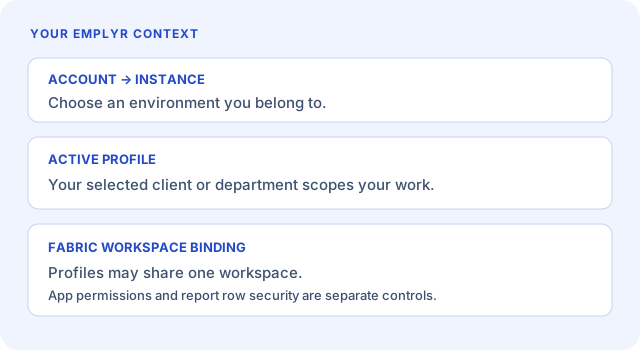
Common tasks
Find the next step
How to sign in and sign out
Use your email or worker login and end your session safely.
Read guide Email-account usersHow to reset or set up your password
Set up a new email account or recover a forgotten password without signing in first.
Read guide Authorised process usersHow to create and submit a process record
Capture a new record, check validation and confirm the submission result.
Read guide Android usersHow to sign in on Android
Use the organisation-approved Android build and load the right profile.
Read guide All usersWhy a page, tab, or button may not be visible
Check the right access and setup conditions for a missing option.
Read guide Members and instance administratorsHow to restore paused profile access
Respond to subscription, entitlement or workspace-placement blocks.
Read guideBrowse by topic
Choose a help section
Guides cover everyday work, profile configuration and administration of your own instances.
Sign up & instance setup
Choose Managed or BYOF, connect your Marketplace purchase and prepare your instance.
12 guides SECTION 02Using Emplyr
Get started, sign in, find your way and manage personal settings or Android work.
16 guides SECTION 03Profiles, people & access
Set up profiles and modules, invite your team and manage roles and access.
12 guides SECTION 04Process Hub
Design, configure and use processes, with feature guides and worked business examples.
68 guides SECTION 05Reports
Open and use reports, configure reporting and resolve report-access problems.
5 guides SECTION 06Fabric & integrations
Connect Fabric, grant application access, monitor capacity and configure data connections.
15 guides SECTION 07Instance administration
Manage your instances, subscriptions, billing, branding and domains.
16 guides SECTION 08Troubleshooting & support
Find help for sign-in, access, setup, notifications and synchronisation problems.
9 guidesLooking for a specific guide?
Browse all 126 guides, or search by the task, feature or error you see.
Need a hand?
Contact your organisation’s Emplyr administrator using your usual internal support channel.